How to Test GPU Stability in Linux with GPU-Burn and Docker (Step-by-Step Guide)
When troubleshooting GPU-related problems on Linux servers, one of the first things I do is run a stress test. Synthetic benchmarks can show performance numbers, but they don’t always reveal hardware instability, memory errors, cooling issues, or power-related problems.
For NVIDIA GPUs, one of the most popular tools for stability testing is GPU-Burn. It places a heavy computational load on the GPU and its memory, making it useful for validating new hardware, checking GPUs after transportation, or investigating unexplained CUDA failures.
In this guide, I’ll show how to run GPU-Burn inside Docker, which is often the easiest approach on modern Linux systems.
Why Use GPU-Burn?
GPU-Burn was created specifically to stress NVIDIA GPUs by performing continuous CUDA computations. Unlike gaming workloads or simple monitoring tools, GPU-Burn keeps the hardware under sustained load and can quickly expose problems such as:
Overheating GPUs
Unstable overclocking
Faulty VRAM
Power delivery issues
Cooling failures
Hardware errors under sustained CUDA workloads
This makes it a useful tool for system administrators, AI engineers, and anyone managing GPU servers.
Please refer to https://github.com/wilicc/gpu-burn
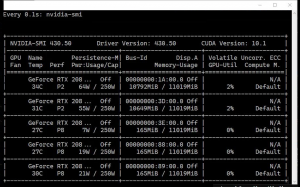
- Add extra repository
distribution=$(. /etc/os-release;echo $ID$VERSION_ID) \
&& curl -s -L https://nvidia.github.io/nvidia-docker/gpgkey | sudo apt-key add – \
&& curl -s -L https://nvidia.github.io/nvidia-docker/$distribution/nvidia-docker.list | sudo tee /etc/apt/sources.list.d/nvidia-docker.list
- Update the system
sudo apt-get update
- Install Docker
sudo apt-get install -y nvidia-docker2
- Restart Docker
sudo systemctl restart docker
- Download GPU Burn
git clone https://github.com/wilicc/gpu-burn
cd gpu-burn
- Build Docker image
docker build -t gpu_burn .
- Run the GPU Burn test
docker run –rm –gpus all gpu_burn
GPU-Burn remains one of the simplest and most effective ways to validate NVIDIA GPU stability on Linux. Combined with Docker, the tool can be deployed in minutes without modifying the host operating system.
If you’re responsible for AI servers, CUDA workloads, or GPU clusters, running a GPU-Burn stress test after deployment can help identify hardware issues before they affect production workloads.